Single-Threaded on the Outside, Multithreaded on the Inside
Learn how Redis is single-threaded on the outside, but multithreaded on the inside. Read the full case study!
Every Rails developer has heard it: “Redis is single-threaded.”
Few people know exactly what that means. And fewer still know that it’s only half the story.
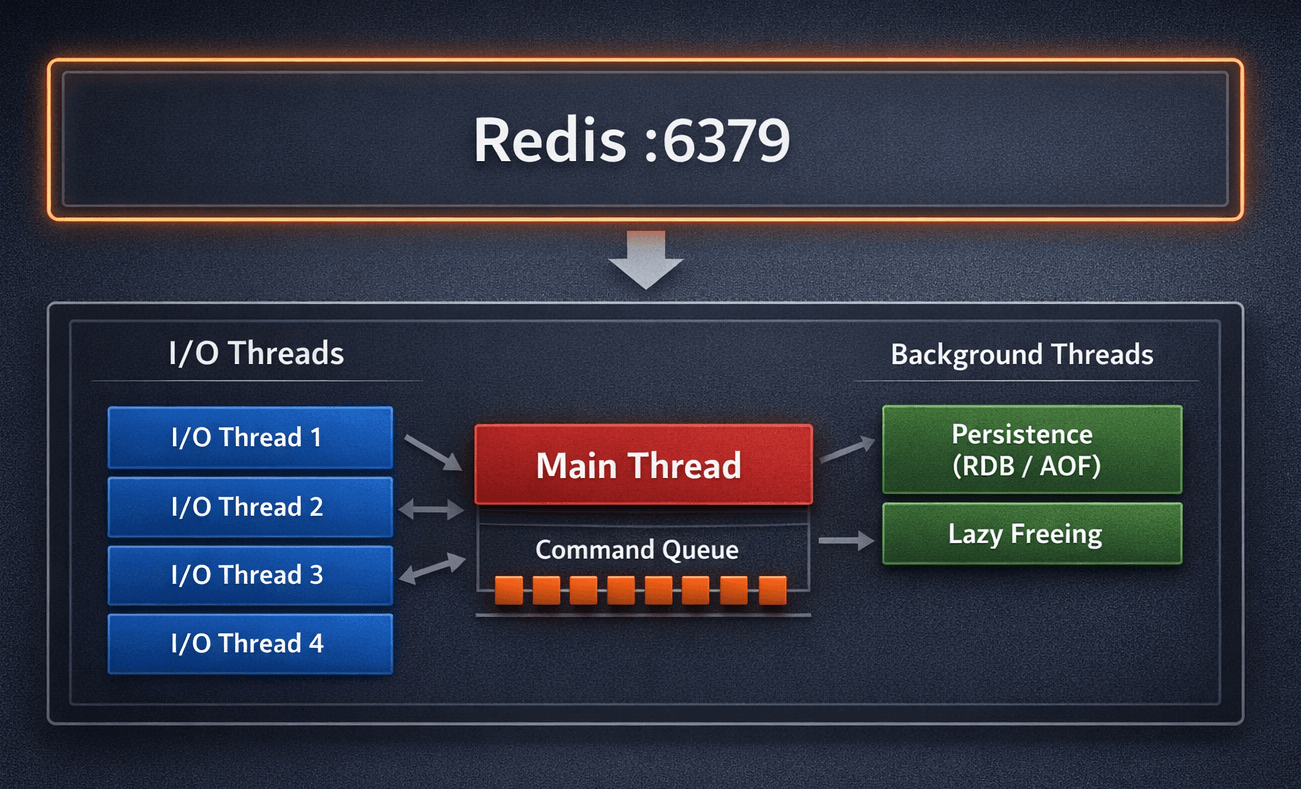
Redis serialises command execution on a single main thread. That part is true. But I/O, persistence, and memory management have been running on separate threads and processes for years. Since Redis 6.0, even network reads and writes are handled by a dedicated pool of I/O threads. At 8 I/O threads, throughput improves by 37–112% on multi-core hardware.
This distinction matters in practice. When you misunderstand Redis’s execution model, you misconfigure it. Misconfigurations in production mean either lost Sidekiq jobs, blocked event loops, or quietly filling memory with no TTLs. This article walks through how Redis actually works, and how to use that knowledge to configure Redis correctly in every part of a Rails application.
The Common MisconceptionLink to section: The Common Misconception
The phrase “Redis is single-threaded” leads engineers to two wrong conclusions:
First, that Redis is therefore slow or poorly suited for concurrent workloads. Second, that because it’s simple under the hood, a single instance with default configuration is fine for everything.
Both are wrong.
Redis’s command serialisation is a deliberate architectural decision. It eliminates lock contention entirely. There are no mutexes around data structures, no deadlocks, no context switches between competing threads trying to access the same key. A single serialisation point is not a bottleneck when that point can process hundreds of thousands of commands per second.
The speed of Redis comes from three things: data lives in RAM, there is no lock overhead, and the event loop is extremely efficient at managing thousands of concurrent connections with almost no CPU waste. “Single-threaded” is not the reason Redis is fast. It’s a side effect of the architecture that makes Redis fast.
What Is Actually Happening Inside RedisLink to section: What Is Actually Happening Inside Redis
A running Redis process is composed of several distinct execution layers.
The Event Loop and I/O MultiplexingLink to section: The Event Loop and I/O Multiplexing
The main thread runs a tight event loop built on the Reactor pattern. Instead of assigning a thread to each client connection, Redis uses the operating system’s notification mechanisms to watch all connections simultaneously: epoll on Linux, kqueue on BSD and macOS, and select as a fallback.
The loop does not block waiting for a client to send data. The OS notifies Redis the moment a socket has data ready to read. This allows one thread to efficiently serve tens of thousands of simultaneous connections. The cost of managing a connection that is idle is nearly zero.
This is what makes the single-threaded model viable. The thread is never sitting idle waiting for network I/O. It is only ever doing actual work: parsing commands and executing them.
I/O Threading Since Redis 6.0Link to section: I/O Threading Since Redis 6.0
Before version 6.0, the main thread was responsible for the entire request lifecycle: reading the socket, parsing the command, executing it, and writing the response back. This worked well, but on multi-core hardware it left significant CPU capacity unused.
Redis 6.0 introduced a dedicated pool of I/O threads. These threads now handle socket reads and writes, freeing the main thread to focus exclusively on command execution. The main thread still executes all commands serially. But the heavy lifting of network I/O is now parallelised.
To enable this:
1
2
3
# redis.conf
io-threads 4
io-threads-do-writes yes
A reasonable starting point is one I/O thread per two CPU cores, leaving headroom for the main thread and OS work. Benchmarks from the Redis authors show a 37–112% throughput improvement with 8 I/O threads under high-connection, high-throughput workloads.
Persistence MechanismsLink to section: Persistence Mechanisms
Redis’s persistence does not happen on the main thread.
RDB (point-in-time snapshots): Redis calls fork(). The child process writes the entire dataset to disk while the main process continues serving requests. The Linux kernel’s copy-on-write semantics mean the child gets a consistent view of memory without duplicating it upfront. Pages are only copied when the main process writes to them.
AOF (Append-Only File): Every executed command is appended to an in-memory buffer. A background thread handles flushing this buffer to disk with fsync. The appendfsync configuration controls the trade-off: always gives the strongest durability guarantee, everysec gives a one-second data loss window with much better performance, no delegates flushing to the OS.
Lazy Memory FreeingLink to section: Lazy Memory Freeing
Deleting a large key — a sorted set with a million members, or a hash with complex nested values — is an O(N) operation. Before Redis 4.0, this happened synchronously on the main thread, causing latency spikes.
Since Redis 4.0, UNLINK offloads memory deallocation to a background thread. The key is immediately removed from the keyspace (so subsequent lookups return nil), but the memory is freed asynchronously. For large keys in production, prefer UNLINK over DEL.
The Full PictureLink to section: The Full Picture
A production Redis process at any moment may have:
- The main thread executing commands serially
- N I/O threads reading and writing sockets in parallel
- A forked child process writing an RDB snapshot
- A background thread flushing the AOF buffer or compacting it during rewrite
- A background thread freeing memory from recent
UNLINKcalls
This is not a single-threaded application. It is a coordinated multi-layered system with a single point of command serialisation.
Atomicity and TransactionsLink to section: Atomicity and Transactions
Every Redis command is atomic. INCR, SETNX, LPUSH — none of these can be interrupted mid-execution by another client. Because all commands execute on the main thread serially, there is no partial state.
MULTI/EXEC provides a form of batched execution: commands queued inside a MULTI block are executed as a unit without interleaving from other clients. However, this is not a transaction in the database sense. There is no rollback. If a command within the block fails at runtime, the others still execute.
For true atomic multi-step logic, Lua scripts are the right tool. A script executed with EVAL runs entirely on the main thread without interruption. This makes it suitable for patterns like atomic increment-with-TTL for rate limiting:
1
2
3
4
5
6
7
8
9
10
11
12
13
14
# Atomic rate limit check: increment counter, set TTL on first call
RATE_LIMIT_SCRIPT = <<~LUA
  local current = redis.call('INCR', KEYS[1])
  if current == 1 then
    redis.call('EXPIRE', KEYS[1], ARGV[1])
  end
  return current
LUA

def rate_limited?(user_id, limit:, window:)
  key = "ratelimit:#{user_id}"
  count = redis.eval(RATE_LIMIT_SCRIPT, keys: [key], argv: [window])
  count > limit
end
WATCH combined with MULTI/EXEC provides optimistic locking: if a watched key is modified by another client before EXEC is called, the entire transaction is aborted and returns nil. This is useful for read-modify-write patterns where you need to detect concurrent modification.
Pub/Sub, Lists, and StreamsLink to section: Pub/Sub, Lists, and Streams
Redis is not only a key-value store. It provides three distinct mechanisms for inter-process communication, each with different guarantees.
Pub/Sub is fire-and-forget. Messages are delivered to all subscribers currently listening on a channel. If no one is subscribed, the message is dropped. There is no persistence, no replay, no acknowledgement. This is what Action Cable uses to broadcast WebSocket messages between Puma workers: it works because the subscriber (the Action Cable server) is always running.
Lists with LPUSH/BRPOP are how Sidekiq implements its job queue. BRPOP blocks until an item is available, then pops it atomically. If the worker process crashes after popping but before finishing the job, the job is lost unless Sidekiq’s visibility timeout and retry logic account for it. This is why Sidekiq requires noeviction — if Redis evicts a job under memory pressure, it disappears silently.
Redis Streams are a persistent, ordered log with consumer groups. A message written to a stream stays there until explicitly deleted. Consumer groups allow multiple workers to divide a stream between them, with explicit acknowledgement (XACK) required before a message is considered processed. For event sourcing, audit logs, or any pattern requiring durable delivery and replay, Streams are the right choice — not Pub/Sub.
| Pub/Sub | Lists (Sidekiq) | Streams | |
|---|---|---|---|
| Persistent | No | Yes (until consumed) | Yes |
| Delivery guarantee | None | At-least-once (with retries) | At-least-once |
| Consumer groups | No | No (single queue) | Yes |
| Replay | No | No | Yes |
| Rails use case | Action Cable | Sidekiq | Event sourcing, audit logs |
The Right Topology: Separate Redis Instances per RoleLink to section: The Right Topology: Separate Redis Instances per Role
The most consequential configuration decision in a Rails application is not what data to cache or how to structure keys. It is whether to use one Redis instance for everything or separate instances per role.
Different parts of a Rails application have fundamentally incompatible requirements:
| Component | Eviction Policy | Persistence Needed | Notes |
|---|---|---|---|
Rails.cache | volatile-lru | No | Losing cache is acceptable |
| Sidekiq | noeviction | Yes (AOF) | Losing a job is a bug |
| Action Cable | noeviction | No | Pub/Sub state is transient |
| Sessions | volatile-lru | Optional | Logged-out users are acceptable |
| Rate limiting | volatile-lru | No | Keys have TTLs by design |
If you run Sidekiq and your cache on the same Redis instance, you must choose one eviction policy for both. Choose volatile-lru and Redis may quietly delete Sidekiq jobs when memory is under pressure — only volatile keys (those with TTLs) are eligible, but Sidekiq keys typically have no TTL, so they would survive until Redis actually fills up and errors. Choose noeviction and Redis will start returning errors on cache writes instead of evicting stale entries.
There is no eviction policy that is correct for both roles simultaneously.
The minimum viable production setup is two Redis instances: one for persistent data (Sidekiq, sessions) with noeviction and AOF enabled, and one for cache with volatile-lru and no persistence.
A complete setup uses four:
1
2
3
4
redis-cache     → Rails.cache, rate limiting     (volatile-lru, no AOF)
redis-queue     → Sidekiq                        (noeviction, AOF enabled)
redis-cable     → Action Cable                   (noeviction, no persistence)
redis-sessions  → Session store                  (volatile-lru, optional AOF)
In your Rails environment configuration:
1
2
3
4
5
6
7
8
9
10
11
12
13
14
15
16
# config/environments/production.rb

# Cache store
config.cache_store = :redis_cache_store, {
  url: ENV["REDIS_CACHE_URL"],
  expires_in: 1.hour,
  error_handler: ->(method:, returning:, exception:) {
    Sentry.capture_exception(exception)
  }
}

# Action Cable adapter
config.action_cable.cable = {
  "adapter" => "redis",
  "url" => ENV["REDIS_CABLE_URL"]
}
1
2
3
4
5
6
7
8
# config/initializers/sidekiq.rb
Sidekiq.configure_server do |config|
  config.redis = { url: ENV["REDIS_QUEUE_URL"] }
end

Sidekiq.configure_client do |config|
  config.redis = { url: ENV["REDIS_QUEUE_URL"] }
end
Connection Pooling in a Puma ApplicationLink to section: Connection Pooling in a Puma Application
Puma runs multiple threads per worker. By default, 5 threads per worker process. Without a connection pool, each thread opens its own TCP connection to Redis. With three Redis-backed components (cache, Sidekiq client, Action Cable), that is 15+ connections per worker, most of which sit idle most of the time.
The connection_pool gem solves this by maintaining a fixed pool of connections shared across threads. A thread checks out a connection, uses it, and returns it to the pool.
1
2
3
4
5
6
7
8
9
10
11
12
# config/initializers/redis.rb

REDIS_POOL = ConnectionPool.new(
  size: ENV.fetch("RAILS_MAX_THREADS", 5).to_i,
  timeout: 3
) do
  Redis.new(
    url: ENV.fetch("REDIS_CACHE_URL"),
    reconnect_attempts: 3,
    reconnect_delay: 0.5
  )
end
1
2
3
4
# Usage anywhere in the application
REDIS_POOL.with do |redis|
  redis.setex("session:#{id}", 3600, payload)
end
The redis-client gem (the default since redis-rb 5.0) also ships with built-in connection pooling. Configure it explicitly rather than relying on defaults:
1
2
3
4
5
6
Redis.new(
  url: ENV["REDIS_URL"],
  reconnect_attempts: 2,
  reconnect_delay: 0.2,
  reconnect_delay_max: 0.5
)
Redis Across All Rails ComponentsLink to section: Redis Across All Rails Components
Here is what correct Redis usage looks like across the standard Rails application stack.
Rails.cacheLink to section: Rails.cache
1
2
3
4
5
6
7
8
9
10
11
12
# app/models/product.rb
def self.featured(limit: 10)
  Rails.cache.fetch("products:featured:#{limit}", expires_in: 30.minutes) do
    where(featured: true).includes(:category).limit(limit).to_a
  end
end

# Fragment caching with automatic versioning
# app/views/products/show.html.erb
<% cache [@product, current_user.role] do %>
  <%= render "product_details", product: @product %>
<% end %>
Always set expires_in. Keys without TTLs accumulate silently until the instance hits maxmemory.
SidekiqLink to section: Sidekiq
1
2
3
4
5
6
7
8
9
10
11
12
13
14
# app/jobs/report_generator_job.rb
class ReportGeneratorJob < ApplicationJob
  queue_as :default
  sidekiq_options retry: 5, dead: false

  def perform(user_id, report_params)
    user = User.find(user_id)
    report = Reports::Generator.call(user, report_params)
    ReportMailer.with(user: user, report: report).send_report.deliver_now
  end
end

# Enqueue
ReportGeneratorJob.perform_later(current_user.id, params.to_unsafe_h)
Sidekiq requires noeviction on its Redis instance. Set maxmemory-policy noeviction and configure memory alerts at 70–80% usage. A full Redis with noeviction returns errors on writes — it does not silently lose data.
Action CableLink to section: Action Cable
1
2
3
4
5
6
7
8
9
10
11
12
13
14
15
16
17
# app/channels/notifications_channel.rb
class NotificationsChannel < ApplicationCable::Channel
  def subscribed
    reject unless current_user
    stream_for current_user
  end

  def unsubscribed
    stop_all_streams
  end
end

# Broadcasting from a job or model callback
NotificationsChannel.broadcast_to(
  user,
  { type: "notification", message: text, timestamp: Time.current.iso8601 }
)
Action Cable uses Redis Pub/Sub. The channel subscription is maintained per Puma worker. When a message is broadcast, it is published to Redis, and all Puma workers subscribed to that channel receive it and forward it to their WebSocket clients.
Rate Limiting with Rack::AttackLink to section: Rate Limiting with Rack::Attack
1
2
3
4
5
6
7
8
9
10
11
12
13
14
15
16
17
18
19
# config/initializers/rack_attack.rb
Rack::Attack.cache.store = ActiveSupport::Cache::RedisCacheStore.new(
  url: ENV["REDIS_CACHE_URL"]
)

# Throttle API calls by IP
Rack::Attack.throttle("api/ip", limit: 100, period: 60) do |req|
  req.ip if req.path.start_with?("/api/")
end

# Throttle login attempts by email
Rack::Attack.throttle("login/email", limit: 5, period: 300) do |req|
  req.params["email"]&.downcase if req.path == "/sessions" && req.post?
end

# Block abusive IPs permanently
Rack::Attack.blocklist("block bad actors") do |req|
  BlockedIp.exists?(ip: req.ip)
end
Rate limiting keys have TTLs by design, so the cache instance with volatile-lru is appropriate here.
Failure Modes and Anti-PatternsLink to section: Failure Modes and Anti-Patterns
These are the most common ways Redis becomes a production incident.
KEYS * in production. This is an O(N) operation that blocks the event loop for every client while it scans the entire keyspace. On an instance with 10 million keys, this can take seconds. Use SCAN with a cursor instead — it iterates incrementally without blocking:
1
2
3
4
5
6
7
8
9
10
# Never do this in production
redis.keys("user:*")

# Do this instead
cursor = "0"
loop do
  cursor, keys = redis.scan(cursor, match: "user:*", count: 100)
  keys.each { |key| process(key) }
  break if cursor == "0"
end
Storing large serialised objects. Values over 1MB indicate a design problem. Redis is optimised for small, frequently accessed values. Storing an entire serialised ActiveRecord object with all associations defeats the purpose of caching — you are just moving database load to Redis without the durability guarantees.
Missing TTLs on cache keys. Memory fills up without warning. Every key written to a cache instance should have an expiration. Use redis-cli --bigkeys and redis-cli info memory periodically to audit key sizes and memory pressure.
BLPOP without a timeout. A blocking pop with no timeout holds a connection indefinitely if the queue is empty. This consumes a slot in the connection pool. Always specify a timeout:
1
2
3
4
5
# Risky: blocks forever if queue is empty
redis.blpop("queue:jobs")

# Safe: returns nil after 5 seconds
redis.blpop("queue:jobs", timeout: 5)
Shared Redis for Sidekiq and cache. Covered above — the eviction policy mismatch will eventually cause data loss. The cost of a second Redis instance (even a small one) is far lower than debugging missing jobs.
No reconnect logic. Network blips happen. Configure reconnect attempts on your Redis client and ensure your application handles Redis::CannotConnectError gracefully rather than returning 500s.
When Not to Use RedisLink to section: When Not to Use Redis
Redis is the right tool for a specific set of problems. It is not the universal answer.
Do not use Redis when:
- Your dataset exceeds available RAM. Redis is an in-memory store. Exceeding
maxmemoryeither blocks writes or starts evicting data. If your working set does not fit in RAM, use a disk-backed store. - You need complex queries. Redis does not support joins, aggregations, or full-text search. These belong in PostgreSQL or Elasticsearch.
- You need ACID guarantees.
MULTI/EXECprovides atomicity and isolation, but not durability in the relational sense. Financial transactions, inventory management, anything where partial writes have business consequences — use PostgreSQL. - You are on Rails 8 with modest requirements. Solid Cache and Solid Queue are SQLite-backed alternatives that remove the operational dependency on Redis entirely. For applications that do not require sub-millisecond cache latency or very high job throughput, they are a legitimate choice.
Production ChecklistLink to section: Production Checklist
Before deploying a Rails application that uses Redis, verify each of these.
Instance configuration:
- Separate Redis instances for Sidekiq (
noeviction, AOF enabled) and cache (volatile-lru, no AOF) maxmemoryexplicitly set on all instances — never rely on OS defaultmaxmemory-policyexplicitly set and matched to the role of the instanceio-threadsconfigured for the number of available CPU cores (Redis 6+)bindset to an internal network interface — never expose Redis to the public internet
Application code:
ConnectionPoolused for all direct Redis access outside of Rails.cache and Sidekiq- All cache keys written with
expires_in SCANused instead ofKEYSanywhere key iteration is neededUNLINKused instead ofDELfor large keys- Lua scripts used for any read-modify-write pattern requiring atomicity
BLPOPcalls have a timeout argument
Observability:
- Memory usage alerts configured at 75% of
maxmemory - Latency monitoring:
redis-cli --latency-history -i 5 - Connection count tracking:
redis-cli info clients - Slow log reviewed regularly:
redis-cli slowlog get 25 - Keyspace statistics monitored:
redis-cli info keyspace
ConclusionLink to section: Conclusion
Redis’s “single-threaded” reputation is a shorthand that obscures more than it explains. Command execution is serialised on one thread — and that is a deliberate, correct design decision that eliminates an entire class of concurrency bugs. Everything else: network I/O, persistence, memory management — is concurrent.
Understanding this changes how you configure Redis. It explains why I/O threads matter on multi-core hardware. It explains why UNLINK exists and when to use it. It explains why a Lua script gives you atomicity guarantees that MULTI/EXEC alone does not.
In a Rails application, Redis touches nearly every layer: cache, background jobs, WebSocket broadcasting, session storage, rate limiting. Each of those roles has different durability and eviction requirements. The correct architecture is not one Redis instance that tries to satisfy all of them — it is separate, purpose-configured instances that each do their job well.
The operational cost of running two or three small Redis instances is low. The cost of debugging a production incident caused by eviction policy mismatch or a blocking KEYS * call is not.
Comments powered by Disqus.